 OPuller
A full vector toolset, in the browser
OPuller is a free vector graphics editor built as an Adobe Illustrator alternative. It runs entirely in your browser — nothing to install, no account — and uses Illustrator's shortcuts, menus and conventions wherever they exist.
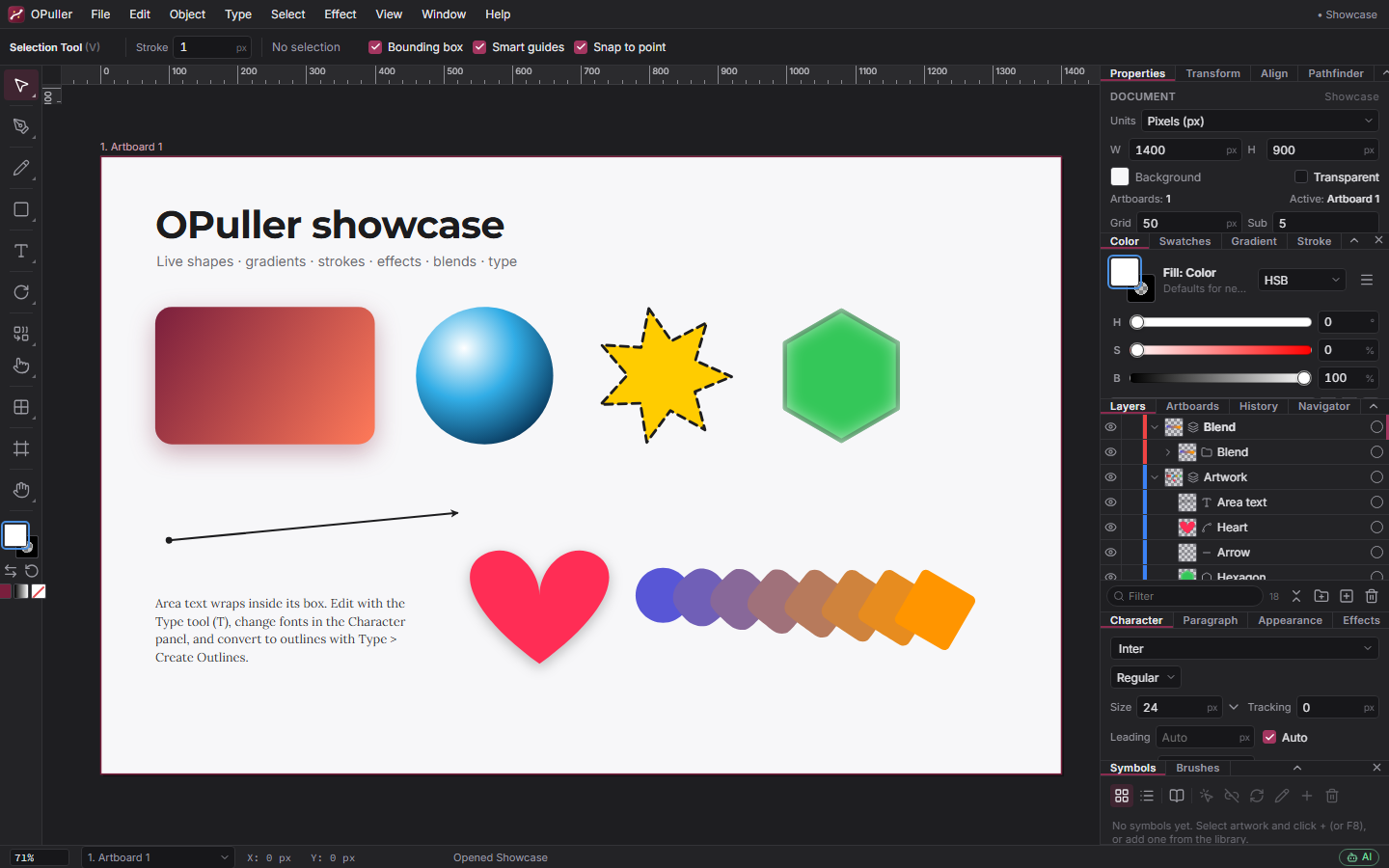
Tools
Over fifty tools, with Illustrator's keyboard shortcuts where they exist (see the shortcut table).
Selection
Selection, Direct Selection, Lasso, Perspective Selection, and Select > Same (fill, stroke, weight, opacity).
Drawing
Pen with Add / Delete / Convert Anchor, Curvature, Pencil, Paintbrush with calligraphic, scatter, art and pattern brushes, Blob Brush, Smooth, Path Eraser, Pixel Brush.
Shapes
Rectangle, Rounded Rectangle, Ellipse, Polygon, Star, Line — as live shapes with editable corners and parameters.
Transform
Rotate, Scale, Reflect, Shear, Free Transform, Width tool, the liquify brushes (Warp, Twirl, Pucker, Bloat, Scallop, Crystallize, Wrinkle).
Build & paint
Shape Builder, Live Paint Bucket and Selection, Eraser, Scissors, Knife, Gradient (including freeform), Mesh, Blend, Symbol Sprayer, Eyedropper, Measure.
Type & layout
Type tool (point, area and type on a path), Graph tool with nine chart types, Perspective Grid, Artboard, Hand and Zoom.
Panels
Properties, Transform, Align, Pathfinder, Color (RGB / HSB / CMYK, tints), Swatches (process, global and spot colours, patterns, print libraries), Gradient (linear, radial, freeform), Stroke (caps, joins, dashes, arrowheads, width profiles, brushes), Layers (drag & drop, thumbnails), Artboards, Symbols, Brushes, History, Navigator, Info, Character, Paragraph, Appearance and Effects — dockable, collapsible and rearrangeable, with a dark and a light theme.
Object operations
- Pathfinder: unite, minus front / back, intersect, exclude, divide, trim, merge, crop, outline; Shape Builder; compound paths; clipping masks.
- Paths: offset path, outline stroke, simplify, join and average, expand and expand appearance, variable-width strokes, arrowheads, dashes.
- Blends by steps, distance or smooth colour, live along any spine.
- Transform each, transform again, arrange, align and distribute, group and isolation mode, lock and hide.
- Symbols (make, place, redefine, sprayer sets) and patterns (make, edit tile, brick / hex layouts, fill options).
- Gradient meshes and freeform gradients.
- Envelope distort: warp with fifteen styles, mesh, top object, free distort.
- 3D extrude & bevel, revolve and rotate; a perspective grid with attach-to-plane and move-along-plane.
- Graphs: nine chart types driven by a data table.
- Image Trace: a built-in potrace-style engine with colour reduction — presets, Black & White / Grayscale / Color, paths / corners / noise settings, abutting or overlapping shapes, fills and centerline strokes for line art, live preview in a Web Worker.
- Effects: drop and inner shadow, outer and inner glow, blur, colour adjustments, round corners — live and editable in the Appearance panel.
- Edit Colors: Recolor Artwork, saturate, adjust colour balance, blend front to back, convert to grayscale, invert, CMYK ↔ RGB.
- Rasterize, crop image, unlimited undo with a History panel.
Colour & print
RGB or CMYK document colour mode, global swatches with tints, spot colours, print swatch libraries, bleed with printer marks (trim, registration, colour bars, page information) in SVG, PDF and EPS export.
Type
Point text, area text and type on a path; fourteen bundled font families plus your system fonts and custom font upload; character and paragraph formatting; Create Outlines to turn text into editable paths.
File formats
| Format | Import | Export |
|---|---|---|
| .opuller project (JSON, images embedded) | Yes — autosave with recovery, recent files, projects stored in the browser | Yes |
| SVG | Yes — shapes, paths, text, gradients, clipping, images; also via the clipboard | Yes — per artboard or selection, optional printer marks |
| Yes — editable objects or a rasterised page | Yes — vector, with bleed and marks | |
| Adobe Illustrator (.ai) | Yes — PDF-compatible and classic AI (PostScript interpreter) | Yes — Illustrator 8 native with editable layers, text, gradients and spot colours, or PDF-compatible |
| EPS | Yes — PostScript interpreter | Yes |
| PNG, JPEG, WebP | Yes — place or drag & drop, then trace or keep as an image | Yes — per artboard or selection, any scale |
AI integration
OPuller ships a Model Context Protocol (MCP) server, so Claude or any MCP-capable assistant can read the document, create and edit objects, run every menu command and tool, simulate mouse gestures and look at the result as an image.
Ready to draw?
The editor opens instantly — no download, no sign-up.